
The WordPress landscape is undergoing a massive architectural shift. For years, developers traded performance for convenience, heavily relying on bloated page builders to get sites out the door quickly. But in 2026, clients demand more. They want immersive, award-winning experiences powered by the GreenSock Animation Platform (GSAP), and they want them to load instantly.
This demand has sparked a fierce debate among frontend architects: Bricks Builder vs Elementor GSAP.
If you are an agency owner or a creative developer looking to scale your business, you are likely asking yourself which is better for GSAP animations Bricks or Elementor?
At Pixloop Lab, we obsess over rendering performance, DOM weight, and 60fps motion. In this comprehensive guide, I am going to break down exactly how both of these builders handle GSAP, why the underlying HTML structure matters more than you think, and which tool you should choose to future-proof your development workflow.
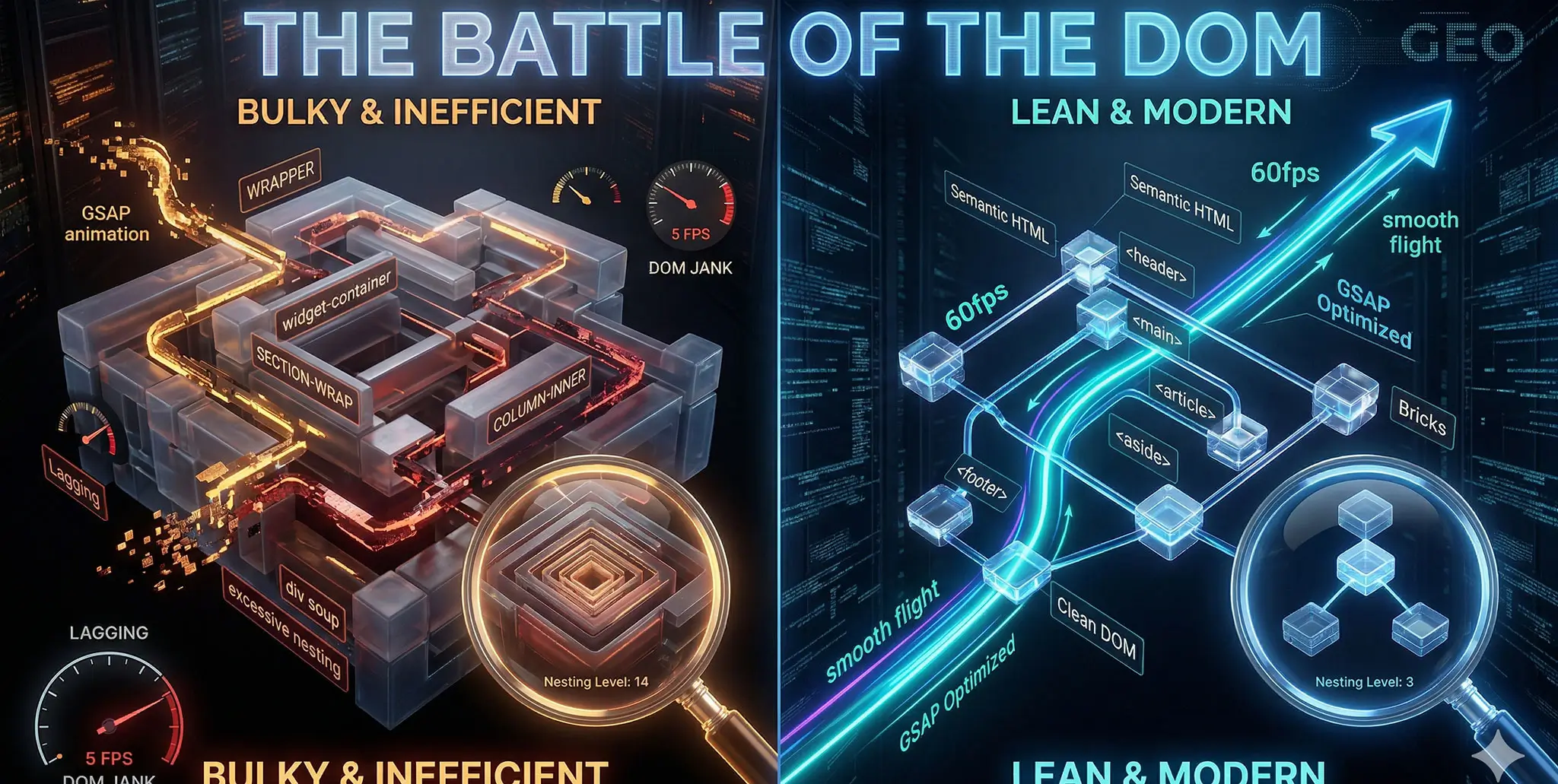
The Battle of the DOM: Why Your Builder Matters for Motion
Before we compare the tools, we must understand the physics of web animation.
GSAP is incredibly fast. It bypasses CSS layout engines and talks directly to the browser to animate elements. However, GSAP is only as fast as the DOM (Document Object Model) it is manipulating.
If your webpage is made up of 2,000 deeply nested HTML <div> tags, every time GSAP asks the browser to move an element, the browser has to calculate the geometry of all those wrappers. This is called “Layout Thrashing,” and it causes your silky-smooth animation to stutter and drop frames.
The core difference between Elementor and Bricks Builder lies entirely in how they construct the DOM.
Elementor & GSAP: The Accessible Giant
Elementor is the undeniable king of market share. It is user-friendly and visually intuitive. But when it comes to high-end JavaScript animation, it presents significant hurdles.
The Downside: "Div Soup"
Elementor is notorious for deep DOM nesting. When you add a simple text heading in Elementor, the HTML output looks something like this:
Your Heading Text
If you apply a GSAP animation to a custom class you added in the Elementor editor, the class is often applied to the outermost wrapper, not the actual text element. This makes targeting specific elements for intricate animations (like SplitText) incredibly frustrating. You find yourself writing messy query selectors like .my-custom-class .elementor-widget-container h2 just to grab the right node.
The Workaround
To use GSAP effectively in Elementor, professional developers rely on placing raw code inside an HTML Widget. You have to be meticulous about assigning CSS classes in the Advanced tab and double-checking the frontend output in your browser’s DevTools to ensure you are animating the correct wrapper.
Elementor can absolutely run GSAP, but you are constantly fighting the builder’s default architecture.
Bricks Builder & GSAP: The Developer’s Dream
Bricks Builder was engineered from the ground up for performance. It is a theme, not just a plugin, and it operates with a “developer-first” mentality.
The Upside: Semantic, Lean HTML
When you add a heading in Bricks Builder, the output is exactly what you tell it to be:
Your Heading Text
There are no forced wrappers. There is no div soup.
For a GSAP developer, this is paradise. When you target .my-custom-class in your JavaScript, you are targeting the exact node you want. This radically reduces the complexity of your GSAP timelines.
The Synergy: Custom Attributes and Class Management
Bricks has native, robust support for Custom Attributes (e.g., data-speed="0.5"). This allows you to build highly modular GSAP code. Instead of hard-coding values into your JavaScript, you can pass parameters from the Bricks visual editor directly into your GSAP loops using dataset attributes.
Furthermore, Bricks handles CSS classes globally. You can assign a class, style it, and use it as your GSAP trigger across the entire site without writing a single line of redundant code.
Code Comparison: Implementing ScrollTrigger
Let’s look at a practical example: A simple ScrollTrigger setup where we want a grid of cards to stagger upwards when they enter the viewport.
The Elementor Implementation
Because Elementor wraps your grid items, your GSAP code often requires extra logic to dig into the DOM tree.
// Elementor GSAP Setup
document.addEventListener("DOMContentLoaded", () => {
// We have to make sure we are grabbing the inner container, not the section wrapper
const cards = document.querySelectorAll(".my-grid-element .elementor-widget-wrap > .elementor-element");
gsap.from(cards, {
scrollTrigger: {
trigger: ".my-grid-element",
start: "top 80%",
},
y: 50,
opacity: 0,
stagger: 0.1,
ease: "power3.out"
});
});
The Bricks Builder Implementation
Because Bricks outputs clean HTML, the Javascript is elegant, readable, and infinitely more maintainable.
// Bricks Builder GSAP Setup
document.addEventListener("DOMContentLoaded", () => {
// Direct, clean targeting
const cards = document.querySelectorAll(".brxe-block.my-card");
gsap.from(cards, {
scrollTrigger: {
trigger: ".my-card-grid",
start: "top 80%",
},
y: 50,
opacity: 0,
stagger: 0.1,
ease: "power3.out"
});
});
Comparative Table: Performance Matrix
To summarize the technical differences, here is how the two builders stack up when evaluated purely for complex frontend animation:
| Technical Metric | Elementor | Bricks Builder | GSAP Impact |
| DOM Depth | 🔴 Deep (Div Soup) | 🟢 Shallow (Semantic) | Bricks prevents CPU bottlenecks during complex Timeline rendering. |
| Element Targeting | 🟡 Messy (Targeting wrappers) | 🟢 Precise (Direct nodes) | Bricks makes .stagger() and SplitText significantly easier to code. |
| Custom Attributes | 🟡 Requires third-party plugins | 🟢 Native & Visual | Bricks allows modular GSAP data attributes directly in the UI. |
| Page Load Speed | 🔴 Heavy CSS/JS assets | 🟢 Vue.js minimal runtime | Bricks ensures GSAP fires immediately without waiting for bloat. |
The Verdict: Which is better for GSAP animations Bricks or Elementor?
If you ask any senior frontend developer which is better for GSAP animations Bricks or Elementor, the definitive answer in 2026 is Bricks Builder.
Elementor is a phenomenal tool for rapid prototyping and building standard business websites. However, if your business model involves selling premium, Awwwards-level interactive templates (like the ones we architect at Pixloop Lab), Elementor’s DOM structure is a massive liability.
Bricks Builder gives you the visual workflow of a modern page builder while preserving the structural integrity of hand-coded HTML. It allows your GSAP code to run faster, cleaner, and with far fewer bugs.
If you are building the future of the web, you need to build on a solid foundation. Bricks is that foundation.
FAQ: Navigating WordPress Animation Environments
Q1: Do I need a specific WordPress plugin to run GSAP on these builders?
A: No. GSAP is an agnostic JavaScript library. The best practice for both Elementor and Bricks is to enqueue the GSAP core and ScrollTrigger via your child theme’s functions.php file (using a CDN), and then write your custom JS in a separate file. Do not rely on bloated “Animation Plugins” if you want peak performance.
Q2: Will migrating my site from Elementor to Bricks break my existing GSAP code?
A: Yes, almost certainly. Your GSAP code is likely targeting Elementor-specific DOM classes (like .elementor-container). When you rebuild the site in Bricks, the HTML structure will change. You will need to refactor your GSAP document.querySelectorAll statements to match your new, cleaner Bricks classes. The good news? Your code will be much shorter afterward.
Q3: How do I handle AJAX page transitions (like Barba.js) with GSAP in Bricks?
A: Bricks is incredibly lightweight, making it a great candidate for AJAX transitions. The golden rule is to use gsap.context(). When navigating between pages without a hard refresh, you must use ctx.revert() to kill all active ScrollTriggers before the new Bricks content is injected, otherwise you will cause severe memory leaks.
Conclusion & Next Steps
The debate of Bricks Builder vs Elementor GSAP ultimately comes down to your ambition as a developer.
If you are content building static pages with simple hover effects, Elementor will serve you well. But if you want to master interactive digital architecture—if you want to control the DOM, choreograph 60fps cinematic sequences, and build premium assets—Bricks Builder provides the environment you need to succeed.
Stop fighting against bloated wrappers. Clean up your HTML, master your JavaScript, and elevate your creative output.


