

If you’ve ever scrolled through an award-winning website and watched elements fade, slide, pin, and scale in perfect sync with your mouse wheel, you’ve experienced GSAP and ScrollTrigger in action. Building this kind of web animation used to require heavy plugins or brittle jQuery hacks. Today, with GSAP scroll animations running natively inside Bricks Builder, you can create cinematic, scroll-triggered experiences directly in WordPress — no bloated animation plugin required.
This guide walks you through how to create scroll-triggered animations with GSAP, from your very first fade-in to a multi-step, pinned storytelling sequence. Whether you’re a beginner testing your first ScrollTrigger or a developer building a complex GSAP animation in WordPress for a client, this tutorial gives you working, copy-paste code.
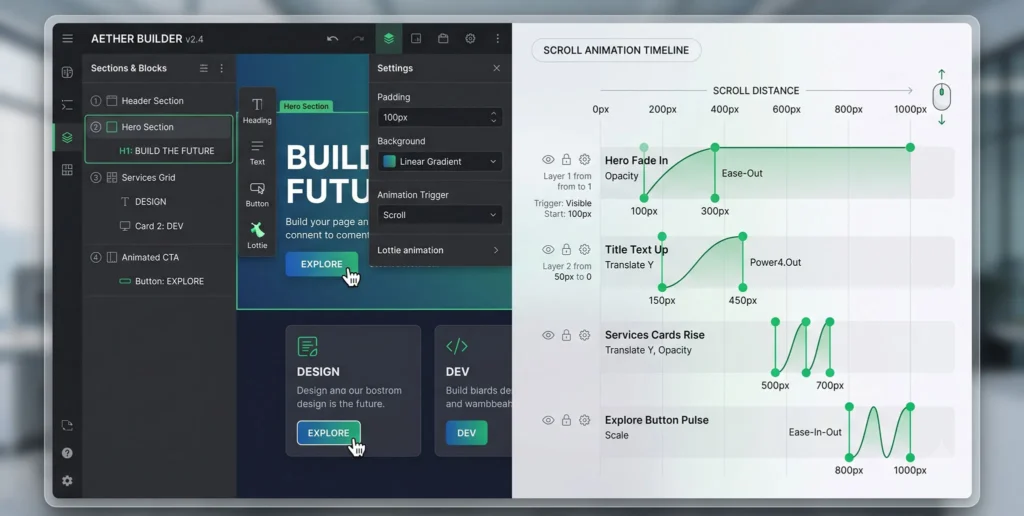
Why GSAP + ScrollTrigger Is the Standard for Modern Web Animation
GSAP (GreenSock Animation Platform) is the industry-standard JavaScript animation library because it’s fast, framework-agnostic, and precise down to the pixel. Its ScrollTrigger plugin lets you tie any animation to the scrollbar — triggering, reversing, or scrubbing based on where the user is on the page.
Paired with Bricks Builder, which outputs clean semantic HTML instead of “div soup,” you get full control over class names and structure — exactly what GSAP needs to target elements reliably.
What You’ll Need Before Starting
- A WordPress site running Bricks Builder
- The GSAP core library + ScrollTrigger plugin loaded via CDN
- A custom JavaScript file (added via Bricks’ Code element or your child theme’s
functions.php) - Basic familiarity with CSS selectors
<!-- Add inside Bricks > Settings > Custom Code (Header) -->
<script src="https://cdnjs.cloudflare.com/ajax/libs/gsap/3.12.5/gsap.min.js"></script>
<script src="https://cdnjs.cloudflare.com/ajax/libs/gsap/3.12.5/ScrollTrigger.min.js"></script>
Step 1: Your First Scroll-Triggered Reveal
Start simple. This is the foundation of every scroll-triggered effect you’ll build afterward — a section that fades and slides into view as it enters the viewport.
gsap.registerPlugin(ScrollTrigger);

gsap.from(".fade-up-section", {
  y: 60,
  autoAlpha: 0,
  duration: 1,
  ease: "power2.out",
  scrollTrigger: {
    trigger: ".fade-up-section",
    start: "top 85%",
    toggleActions: "play none none reverse"
  }
});
Beginner tip: toggleActions: "play none none reverse" means the animation plays once when scrolling down and reverses if the user scrolls back up past the trigger point.
Step 2: Building a Complex, Multi-Element Timeline
A single .from() tween is easy. A complex GSAP animation in WordPress usually means several elements animating in sequence — a heading, then a paragraph, then a button — all tied to one scroll trigger.
const heroTl = gsap.timeline({
  scrollTrigger: {
    trigger: ".hero-wrapper",
    start: "top 70%",
    toggleActions: "play none none reverse"
  }
});

heroTl
  .from(".hero-heading", { y: 40, autoAlpha: 0, duration: 0.8 })
  .from(".hero-subtext", { y: 30, autoAlpha: 0, duration: 0.7 }, "-=0.4")
  .from(".hero-cta", { scale: 0.9, autoAlpha: 0, duration: 0.5 }, "-=0.3");
Why Use a Timeline Instead of Separate Tweens?
- Sequencing control: The
"-=0.4"position parameter overlaps animations for a smoother, more natural cascade. - Single source of truth: One
scrollTriggercontrols the entire sequence instead of managing three separate ones. - Easier maintenance: Adjusting timing means editing one timeline, not hunting through multiple tweens.
Step 3: Scrubbed Animations Tied Directly to Scroll Position
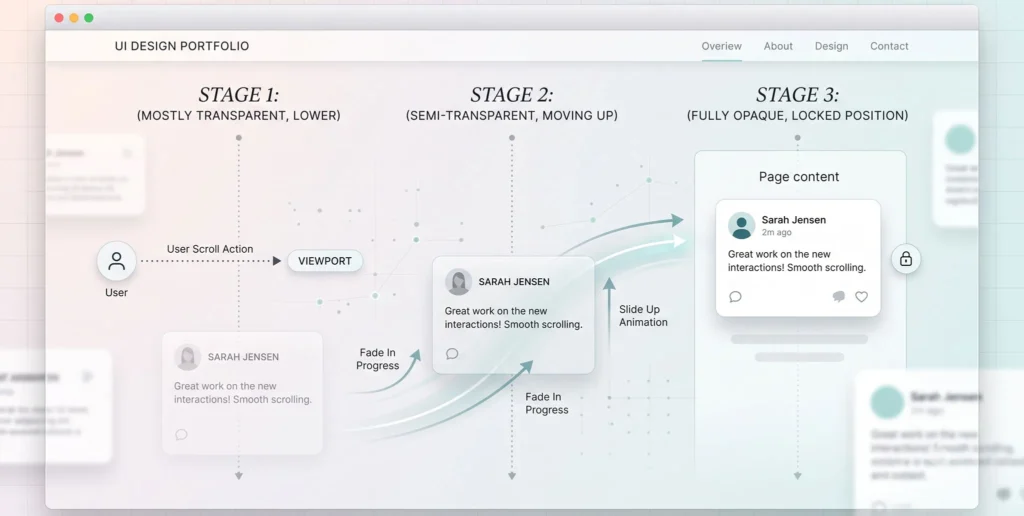
For a truly cinematic ScrollTrigger WordPress effect — like an image scaling as the user scrolls through a section — use scrub instead of toggleActions. This ties the animation’s progress directly to the scrollbar position rather than playing it once.
gsap.to(".parallax-image", {
  scale: 1.3,
  ease: "none",
  scrollTrigger: {
    trigger: ".parallax-section",
    start: "top bottom",
    end: "bottom top",
    scrub: 1.2
  }
});
Setting scrub: 1.2 (a number rather than true) adds a slight easing delay, smoothing out choppy scroll input from standard mouse wheels.
Step 4: Pinning Sections for Storytelling Sequences
Pinning locks a section in place while content scrolls past or animates within it — the technique behind most high-end “scrollytelling” pages.
ScrollTrigger.create({
  trigger: ".pinned-story-section",
  start: "top top",
  end: "+=2000",
  pin: true,
  scrub: true,
  animation: gsap.timeline()
    .to(".story-slide-1", { autoAlpha: 0 })
    .to(".story-slide-2", { autoAlpha: 1 })
    .to(".story-slide-3", { autoAlpha: 1 })
});
Step 5: Cleaning Up with gsap.context()
If your Bricks Builder site uses AJAX page transitions, old ScrollTrigger instances can linger in memory and collide with new ones. Wrap every animation in gsap.context() so it can be cleanly reverted.
let ctx = gsap.context(() => {
  gsap.from(".fade-up-section", {
    y: 60,
    autoAlpha: 0,
    scrollTrigger: { trigger: ".fade-up-section", start: "top 85%" }
  });
});

// On AJAX page destroy event:
document.addEventListener("bricks/ajax/destroy", () => ctx.revert());
Comparative Table: Animation Techniques and When to Use Them
| Technique | Best For | Trigger Type | Complexity |
|---|---|---|---|
gsap.from() single tween |
Simple fade-ins, one element | toggleActions |
Beginner |
gsap.timeline() |
Sequenced multi-element reveals | toggleActions |
Intermediate |
scrub animation |
Progress-based effects (zoom, rotate) | scrub: true/number |
Intermediate |
pin: true |
Storytelling, sticky sections | scrub + pin |
Advanced |
gsap.context() |
AJAX/PJAX sites, cleanup safety | N/A (wrapper) | All levels |
Real-World Reference Sites
- Apple product pages — heavy use of pinned, scrubbed 3D reveals synced to scroll.
- Stripe.com — layered timeline animations combining fades, scales, and parallax.
- Awwwards.com showcase sites — a searchable gallery of GSAP-powered scroll experiences for inspiration.
FAQ: Scroll-Triggered Animations in WordPress
Q1: Do I need a plugin to use GSAP in WordPress? A: No. GSAP and ScrollTrigger are plain JavaScript libraries loaded via CDN or a local script file. You don’t need a WordPress animation plugin — just a code element (like Bricks Builder’s Code block) or a custom script enqueued in your theme.
Q2: Will complex ScrollTrigger animations slow down my WordPress site? A: Not if implemented correctly. GSAP is GPU-accelerated and lightweight. Performance issues usually come from unoptimized images or too many simultaneous scrub animations, not GSAP itself. Always call ScrollTrigger.refresh() after page load to keep calculations accurate.
Q3: Can I combine multiple pinned sections on one page? A: Yes, but each pinned section needs its own ScrollTrigger.create() instance with distinct start/end values. Test carefully, since overlapping pin ranges are a common cause of layout jumps.
Final Thoughts
Creating complex scroll-triggered animations with GSAP in WordPress comes down to layering the right technique at the right moment: simple tweens for small reveals, timelines for sequences, scrub for scroll-tied motion, and pinning for full storytelling sections. Combined with Bricks Builder’s clean HTML output, you have everything needed to build scroll experiences that rival top agency portfolios — without a single animation plugin.

