

When translating a pixel-perfect Figma design into a live WordPress environment, the biggest bottleneck isn’t the layout—it is the motion. Most developers approach web animation as an afterthought. They build the page, and then write custom JavaScript targeting specific IDs to make a hero section fade in or a text block mask reveal.
This approach is catastrophic for scalability. If you have a 50-page corporate website, writing one-off animation scripts for every single page creates a bloated, unmaintainable nightmare.
To command top-tier agency pricing, you must transition from a “page builder” to a “system architect.” You need to know exactly how to build a reusable GSAP animation system in Bricks Builder. By leveraging the GreenSock Animation Platform alongside Bricks Builder GSAP global classes, you can engineer a centralized, highly optimized engine. You write the complex JavaScript once, and then deploy elite, 60fps animations simply by typing a class name into the Bricks visual interface.
Here is the definitive guide to building a professional, scalable motion architecture.
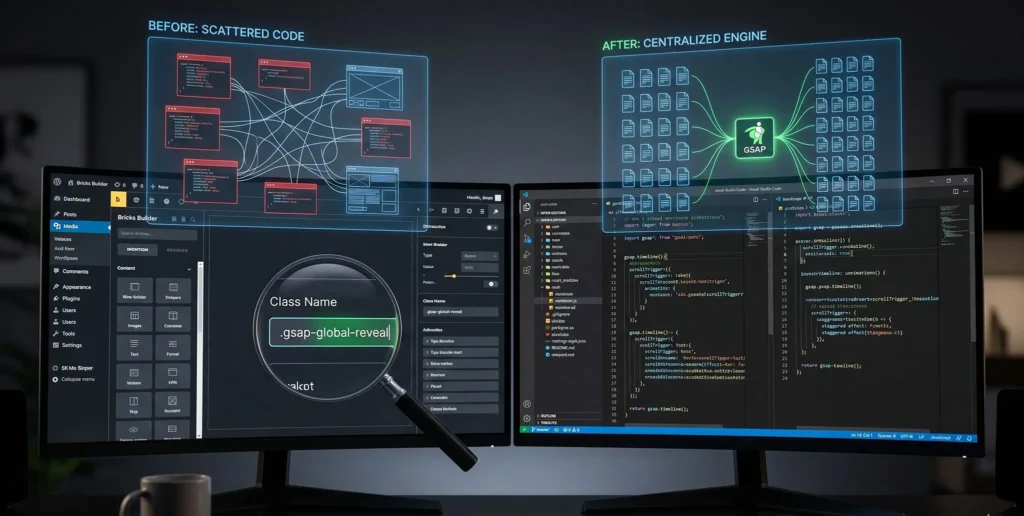
The Amateur Trap: “One-Off” Animation Coding
Look at how top UI/UX designers work in tools like Figma. They don’t design 100 different buttons; they design a “Primary Button Component” and reuse it.
Yet, when developers move to WordPress, they abandon this component-based logic. They drop a <script> tag into an HTML widget, write a GSAP timeline targeting #home-hero-text, and call it a day. Next week, the client wants that exact same text reveal on the “About” page. The developer copies the code, pastes it, changes the ID, and repeats.
This results in:
-
Massive File Sizes: You are loading duplicate logic across the site.
-
Maintenance Hell: If the client wants the animation to be 0.2 seconds faster, you have to find and edit 50 different script tags.
-
FOUC (Flash of Unstyled Content): Disorganized scripts often misfire, causing elements to blink visibly before animating.
Why Bricks Builder is the Ultimate System Canvas
To build a global system, you need an environment that respects global rules. Bloated builders like Elementor force deep, unpredictable wrappers around your elements, making it nearly impossible to write clean, universal CSS or JS targets.
Bricks Builder is the opposite. It outputs bare-metal HTML. If you assign the class .gsap-fade-up to a heading in Bricks, the DOM output is strictly <h1 class="gsap-fade-up">.
Furthermore, Bricks features a robust, native Global Classes manager and full support for custom HTML Data Attributes. This allows us to build a highly modular GSAP engine where the JavaScript lives in one single file, but the visual control remains entirely inside the Bricks editor UI.
Step 1: Architecting the Global Class Taxonomy (BEM)
The foundation of our system is a strict naming convention. We will use a prefix (like .gsap-) so that any developer on your team immediately knows this class is tied to the JavaScript animation engine.
Let’s define three core animations commonly used in premium landing pages:
-
.gsap-fade-up: A standard vertical entrance. -
.gsap-mask-reveal: An architectural image masking reveal. -
.gsap-stagger-parent: A parent class that sequentially animates its children (perfect for feature grids).
The CSS Defense Line (Preventing FOUC)
Because GSAP uses JavaScript, it executes after the HTML is parsed. Without a CSS defense, your users will see the elements jump. Open your Bricks Global CSS and add this rule:
/* Hide all GSAP elements initially. GSAP's autoAlpha will reveal them. */
.gsap-fade-up,
.gsap-mask-reveal,
.gsap-stagger-parent > * {
  visibility: hidden;
}
Step 2: Writing the Core GSAP Engine
Now, we write the “Brain” of the system. This script should be enqueued via your Bricks Child Theme functions.php file so it loads globally.
Instead of writing individual timelines, we use document.querySelectorAll to loop through the DOM, finding any element with our global classes and automatically attaching a ScrollTrigger to it.
document.addEventListener("DOMContentLoaded", () => {
  gsap.registerPlugin(ScrollTrigger);

  // Use gsap.context() for professional memory management
  let ctx = gsap.context(() => {

    // 1. Global Fade Up System
    const fadeElements = document.querySelectorAll('.gsap-fade-up');
    fadeElements.forEach((el) => {
      gsap.fromTo(el,
        { y: 60 },
        {
          y: 0,
          autoAlpha: 1, // Handles the visibility: hidden
          duration: 1.2,
          ease: "power3.out",
          scrollTrigger: {
            trigger: el,
            start: "top 85%",
            toggleActions: "play none none reverse"
          }
        }
      );
    });

    // 2. Global Stagger Grid System
    const staggerParents = document.querySelectorAll('.gsap-stagger-parent');
    staggerParents.forEach((parent) => {
      const children = parent.children; // Targets the Bricks blocks inside the grid
      gsap.fromTo(children,
        { y: 40 },
        {
          y: 0,
          autoAlpha: 1,
          duration: 1,
          stagger: 0.15, // Sequential delay
          ease: "power3.out",
          scrollTrigger: {
            trigger: parent,
            start: "top 80%",
            toggleActions: "play none none reverse"
          }
        }
      );
    });

    // 3. Global Image Mask Reveal
    const maskElements = document.querySelectorAll('.gsap-mask-reveal');
    maskElements.forEach((el) => {
      gsap.fromTo(el,
        { clipPath: "inset(100% 0% 0% 0%)", scale: 1.2 }, // Start hidden from top, zoomed in
        {
          clipPath: "inset(0% 0% 0% 0%)",
          scale: 1,
          duration: 1.5,
          ease: "power4.inOut",
          autoAlpha: 1,
          scrollTrigger: {
            trigger: el,
            start: "top 75%",
          }
        }
      );
    });

  }); // End Context
});
With this single file loaded, you can open any page in Bricks Builder, type .gsap-fade-up into the class input of a heading, an image, or a button, and it will automatically animate at 60fps when the user scrolls to it. You have productized your motion design.
Step 3: Granular Control via Data Attributes
A rigid system is a broken system. What if you want one specific .gsap-fade-up heading to be delayed by 0.5 seconds so it waits for a hero image to load? You don’t want to create a whole new class like .gsap-fade-up-delay-05.
We achieve granular control by utilizing Bricks Builder’s native Custom Attributes UI to pass data into our GSAP engine.
Updating the JS to Read Attributes
Modify the .gsap-fade-up loop in your JavaScript to look for data-gsap-delay and data-gsap-duration.
const fadeElements = document.querySelectorAll('.gsap-fade-up');
    fadeElements.forEach((el) => {

      // Read the data attribute, or fallback to a default value
      let customDelay = el.getAttribute('data-gsap-delay') || 0;
      let customDuration = el.getAttribute('data-gsap-duration') || 1.2;

      gsap.fromTo(el,
        { y: 60 },
        {
          y: 0,
          autoAlpha: 1,
          delay: parseFloat(customDelay),
          duration: parseFloat(customDuration),
          ease: "power3.out",
          scrollTrigger: {
            trigger: el,
            start: "top 85%",
          }
        }
      );
    });
Now, in the Bricks Editor, you apply the .gsap-fade-up class to your element. Then, go to Attributes, add the name data-gsap-delay, and set the value to 0.5.
The animation engine dynamically adjusts. You have given your design team total control over motion pacing directly inside the Bricks GUI, without them ever needing to touch the JavaScript file.
Real-World Masterclasses: System-Driven Motion
To see the value of a utility-based motion system, analyze top-tier digital products:
-
Stripe: Their landing pages are famous for buttery-smooth entrances. They do not write unique code for every icon. They use a highly optimized, centralized intersection-observer architecture. Applying a utility class to an element instantly hooks it into their global physics engine.
-
Apple: When scrolling through an iPhone product page, the text reveals and image masks follow a strict mathematical rhythm. By utilizing systemized data-attributes, Apple’s engineers can rapidly build incredibly long, complex scrollytelling pages without bloating the DOM with redundant script tags.
By bringing this architecture into Bricks Builder, you are adopting enterprise-level frontend standards.
Comparative Table: Manual Coding vs. Global Class System
| Workflow Metric | One-Off Manual JS Coding | Bricks Global Class System | Agency ROI & Impact |
| Implementation Speed | 5-10 minutes per element | < 5 Seconds (Type a class name) | Scales agency output; launch premium sites faster. |
| Code Maintenance | Hunting through scattered script tags | 1 Centralized JS File | Global updates (e.g., changing the default easing curve) take 10 seconds. |
| Page Weight | Heavy (Redundant logic) | Ultra-Light (Reused loops) | Guarantees high Core Web Vitals and LCP scores. |
| Non-Dev Usability | Impossible without code knowledge | High (Handled via UI attributes) | Allows UX designers to tweak animation pacing safely in Bricks. |
FAQ: Troubleshooting Your Animation System
Q1: How do I handle responsive animations? I don’t want heavy mask reveals running on mobile phones. A: You should integrate GSAP’s gsap.matchMedia() directly into your central engine. Wrap your .forEach loops inside a matchMedia breakpoint.
let mm = gsap.matchMedia();
mm.add("(min-width: 768px)", () => {
   // Put your complex mask reveals and staggers here
});
mm.add("(max-width: 767px)", () => {
   // Put simpler, battery-friendly fade-ups here
});
This ensures your global classes automatically degrade gracefully based on the user’s device.
Q2: Does this system conflict with Bricks’ native PJAX (AJAX page loading)? A: It will, unless you manage your context. When navigating via AJAX, the browser does not hard-refresh, leaving old ScrollTrigger markers in memory. Because we wrapped our entire engine in gsap.context(), you simply add an event listener for the Bricks PJAX event (bricks/ajax/success), call ctx.revert();, and then re-initialize the function.
Q3: Can I use this for complex GSAP plugins like SplitText? A: Absolutely. You can create a global class called .gsap-split-reveal. In your central engine, loop through those elements, run the new SplitText(el, {type: "lines"}) command, and apply the stagger animation to the resulting line arrays. Just remember to add a window.addEventListener('resize') function to revert and re-split the text if the user rotates their mobile device, preventing layout breaks.
Conclusion & The Architect’s Next Steps
Learning how to build a reusable GSAP animation system in Bricks Builder is the defining step in evolving from a website builder to a digital architect.
By utilizing Bricks Builder GSAP global classes, you eliminate code bloat, eradicate FOUC, and guarantee 60fps performance across thousands of pages. You establish a “single source of truth” for your motion design, bridging the gap between component-based Figma files and the live WordPress DOM.
Stop repeating yourself. Start building systems.
Your next practical step: Open your Bricks Child Theme functions.php, enqueue a new animation-engine.js file, and paste the core loop provided in Step 2. Then, open any Bricks page, apply the .gsap-fade-up class to your hero elements, and watch your new proprietary physics engine take control.

