
If you’ve ever landed on a website where the headline gently fades up, the subtext slides in, and a background image subtly shifts as you scroll — that’s a scroll-triggered hero section, and it’s one of the most popular effects built with GSAP and ScrollTrigger. The good news? You don’t need to be a senior developer to build one.
This guide walks you through, step by step, how to build a scroll-triggered hero section with GSAP inside Bricks Builder on WordPress — with copy-paste-ready code, a comparison table, and answers to the questions beginners ask most.
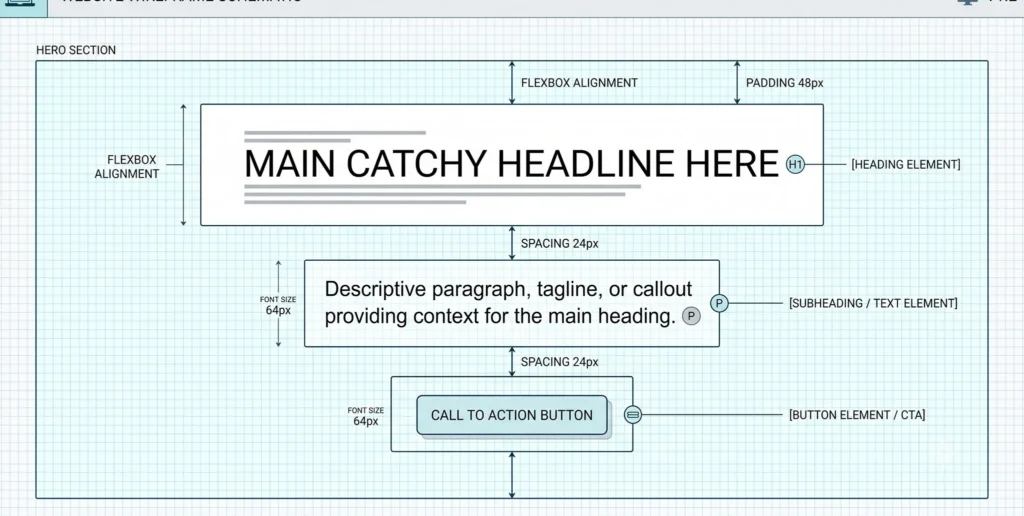
button reveal in sequence as the page loads and scrolls.
What Is a Scroll-Triggered Hero Section, and Why Use One?
A scroll-triggered hero section is the top block of your homepage (the “hero”) animated using web animation techniques tied to scroll position or page load, instead of just appearing statically. Instead of your title, image, and button just “being there,” they animate into view — building a polished, premium first impression.
Two libraries make this possible:
- GSAP (GreenSock Animation Platform) — a JavaScript animation engine known for buttery-smooth, high-performance motion.
- ScrollTrigger — a free GSAP plugin that lets animations play, reverse, or scrub based on scroll position.
Combined with Bricks Builder, which outputs clean, lightweight HTML, you get full creative control without fighting a bloated page builder.
Step 1: Add GSAP and ScrollTrigger to Your WordPress Site
Before writing any animation code, you need to load the GSAP library. In Bricks Builder, the easiest beginner-friendly method is to add the scripts through Bricks > Settings > Custom Code, in the “Header Scripts” section.
<!-- Load GSAP core + ScrollTrigger plugin from CDN -->
<script src="https://cdnjs.cloudflare.com/ajax/libs/gsap/3.12.5/gsap.min.js"></script>
<script src="https://cdnjs.cloudflare.com/ajax/libs/gsap/3.12.5/ScrollTrigger.min.js"></script>
Then register the plugin at the top of your custom JavaScript file (you can add this in Footer Scripts, since it should load after the page content):
gsap.registerPlugin(ScrollTrigger);
Beginner tip: Always load your GSAP animation code in the footer, not the header. If your JavaScript runs before the HTML elements exist on the page, GSAP has nothing to animate — and you’ll just see a blank error in your browser console.
Step 2: Structure Your Hero Section in Bricks Builder
Inside the Bricks Builder editor, build your hero with simple, separate elements rather than one big text block. This gives you control to animate each piece independently:
- A Heading element (your H1)
- A Text element (your subheading)
- A Button element (your call-to-action)
Give each one a unique CSS class in the Bricks “Style” panel:
.hero-title.hero-subtitle.hero-cta
These class names are what your GSAP code will target.
Step 3: Write Your First Scroll-Triggered Animation
Now for the fun part. Here is a simple, beginner-friendly animation that fades and slides each hero element into place as soon as the page loads:
gsap.registerPlugin(ScrollTrigger);

// Create a timeline so animations play in sequence
const heroTimeline = gsap.timeline({
  defaults: { ease: "power2.out", duration: 1 }
});

heroTimeline
  .from(".hero-title", { y: 40, opacity: 0 })
  .from(".hero-subtitle", { y: 30, opacity: 0 }, "-=0.6") // overlaps slightly
  .from(".hero-cta", { y: 20, opacity: 0 }, "-=0.5");
This runs once on page load. But what if you want the hero background to shift only as the user scrolls? That’s where ScrollTrigger comes in:
gsap.to(".hero-background", {
  yPercent: 20,       // moves the background slower than the scroll (parallax)
  ease: "none",
  scrollTrigger: {
    trigger: ".hero-section",
    start: "top top",
    end: "bottom top",
    scrub: true         // ties the animation progress directly to scroll position
  }
});
The scrub: true setting is what makes it feel connected to your mouse or trackpad, rather than playing automatically.
Common Beginner Mistakes to Avoid
- Animating with plain CSS
opacity: 0in Bricks Builder’s UI instead of controlling visibility through GSAP — this can cause a flash of unstyled content before your JavaScript loads. - Forgetting
ScrollTrigger.refresh()after images lazy-load. If your hero image loads late and changes the page height, your trigger points can end up in the wrong place. - Skipping the CDN version lock. Always specify a GSAP version number in your script URL so a future library update doesn’t silently break your animation.
GSAP Approaches Compared
| Approach | Best For | Difficulty | Scroll-Linked? |
|---|---|---|---|
CSS-only animation (@keyframes) |
Simple fade-ins on page load | Beginner | No |
GSAP .from() timeline |
Sequenced hero reveal on load | Beginner | No |
GSAP + ScrollTrigger (scrub: true) |
Hero elements that move with scroll | Intermediate | Yes |
GSAP + ScrollTrigger + pin: true |
Hero stays fixed while content scrolls over it | Advanced | Yes |

This table gives you a quick way to decide which technique fits your project — start simple, then layer in ScrollTrigger once you’re comfortable.
Real-World Inspiration
Plenty of well-known sites use this exact pattern:
- Apple’s product pages use scrubbed GSAP-style scroll animations to reveal hardware details progressively as you scroll.
- Agency portfolio sites commonly use a fading, staggered hero reveal (similar to the timeline above) as a signature “premium load” moment.
Studying how these sites sequence their timing and easing is one of the fastest ways to level up your own animations.
FAQ: Scroll-Triggered Hero Sections with GSAP
Q1: Do I need a paid GSAP license to use ScrollTrigger?
No. As of the current GSAP release, ScrollTrigger and the vast majority of GSAP’s plugins are free to use, including in commercial WordPress projects. Always check GreenSock’s current licensing page before launching a client site, since terms can be updated.
Q2: Why does my hero animation play instantly instead of waiting for scroll?
This usually means you used a plain gsap.to() or gsap.from() call without a scrollTrigger property. Without that property, GSAP has no reason to wait — it just plays the animation as soon as the page loads. Add a scrollTrigger: { trigger: ".your-element", start: "top 80%" } object to link it to scroll position.
Q3: Can I use this same technique on mobile devices?
Yes, but test carefully. Mobile browsers resize their viewport as the address bar hides during scroll, which can throw off your trigger calculations. Adding ScrollTrigger.config({ ignoreMobileResize: true }) to your JavaScript file helps keep mobile scroll animations stable.
Ready to go further? Once your hero section is running smoothly, the next step is exploring pinned sections and parallax backgrounds with ScrollTrigger’s pin property.

