Using ComfyUI and Midjourney for Cinematic Hero Sections: AI Imagery with GSAP (2026)

Back to Article

If you are still downloading flat, static stock photos from Unsplash for your website headers, you are living in the past.

In 2026, user expectations have shifted drastically. When a visitor lands on a website, they don’t want to read a brochure; they want to step into an environment. The most elite digital agencies are achieving this by using ComfyUI and Midjourney for cinematic hero sections. By combining generative AI imagery with GSAP (GreenSock Animation Platform), we can transform flat pixels into immersive, 2.5D spatial experiences.

As someone who builds and monetizes high-end web templates daily, I can tell you that this specific workflow—merging AI node-based generation with high-performance JavaScript—is the ultimate cheat code for creative developers.

In this comprehensive guide, I will walk you through the entire pipeline: from generating the assets in ComfyUI, animating them with GSAP, and finally, using Kitstarter.io to package your cinematic hero templates so you can deploy them instantly across multiple client sites.

The 2026 Standard: Why Static Images Are Failing Your Hero Templates

The hero section is your digital handshake. You have exactly 3 seconds to communicate value, establish brand authority, and guide the user’s eye.

A flat JPEG cannot do this effectively. It has no depth. It cannot react to the user’s cursor. It cannot guide the scroll.

When you combine AI imagery with GSAP, you aren’t just adding “movement” to a page; you are creating parallax depth. You are separating the subject from the background. As the user scrolls, the background moves slower than the foreground, creating a cinematic, spatial illusion directly inside the browser. This commands attention and drastically reduces bounce rates.

Asset Generation: Midjourney vs. ComfyUI for Web Designers

To create a cinematic 2.5D effect, a single flat image is useless. We need Layers (Foreground, Midground, Background) and occasionally Depth Maps.

Here is how professional web animators utilize the AI stack:

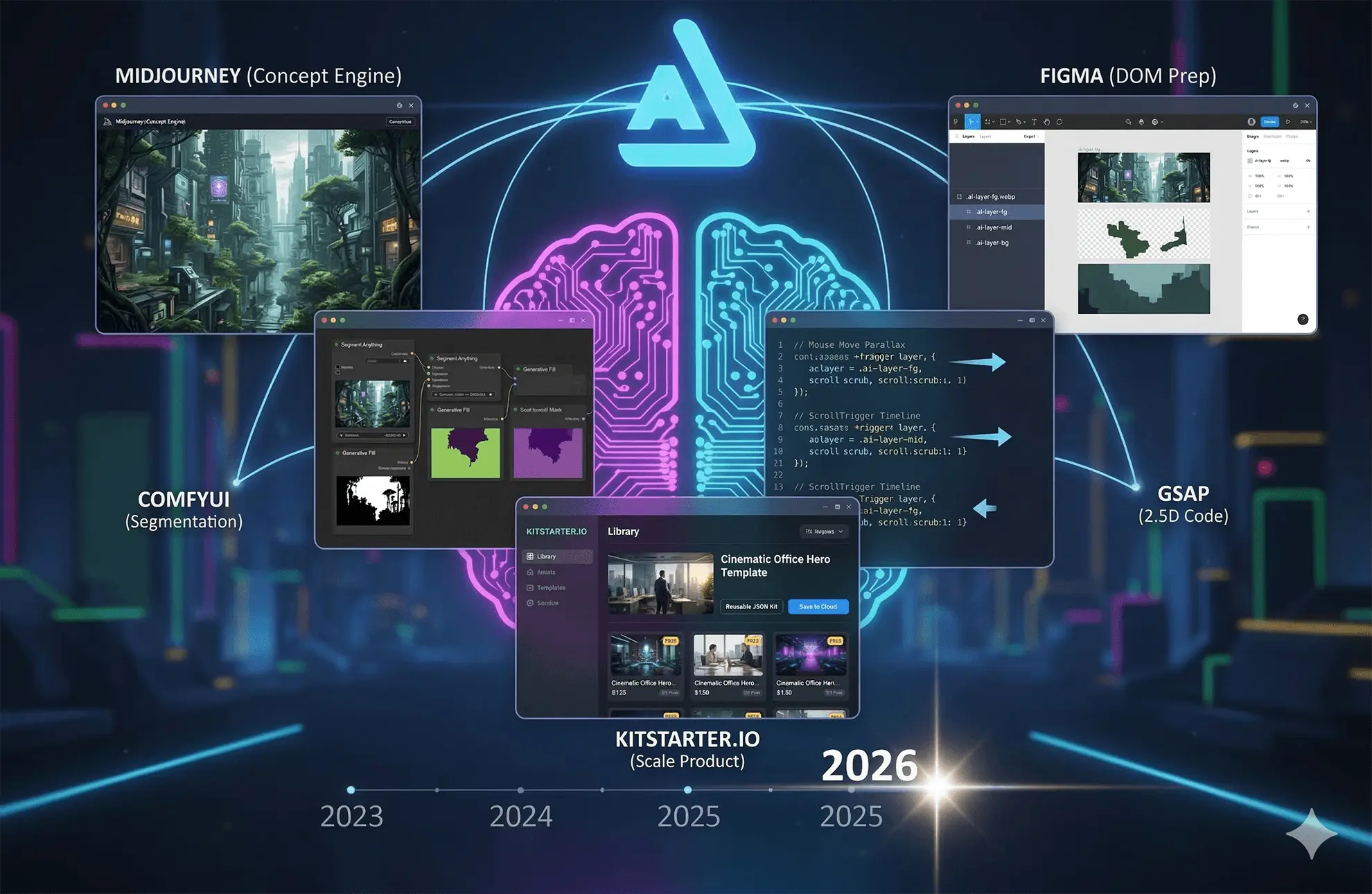
1. Midjourney: The Concept Engine

Midjourney is unparalleled for art direction. I use it to generate the initial concept of the hero section. Let’s say we want a “Cyberpunk CoWorker Office Space.” Midjourney will give us the perfect lighting, composition, and aesthetic. However, Midjourney spits out a flattened image.

2. ComfyUI: The Developer’s Laboratory

This is where the magic happens. ComfyUI is a node-based Stable Diffusion interface. Unlike Midjourney, ComfyUI gives you surgical control over the generation pipeline.

Once I have my concept, I bring it into ComfyUI to build my web assets:

  • Layer Splitting (Segment Anything): I use segmentation nodes to perfectly mask out the foreground subject (e.g., a desk or a person).

  • Outpainting/Inpainting: When you extract a foreground element, it leaves a hole in the background. I use ComfyUI’s generative fill nodes to automatically paint in the missing background data.

  • Depth Map Generation: I run the image through a Depth ControlNet to generate a precise grayscale depth map. This is essential if you want to use WebGL/Three.js shaders, but even for standard GSAP DOM manipulation, having perfectly split layers is mandatory.

The result? Instead of one .jpg, I now have three optimized .webp files with transparent alpha channels, ready for the DOM.

Bringing it to Life: The GSAP Parallax Code

Now that we have our AI-generated layers, we need to stack them in Elementor (or your HTML structure) using CSS position: absolute, ensuring they sit on top of each other perfectly.

Then, we use GSAP to breathe life into them. We want the layers to react slightly to the mouse movement, and aggressively to the scrollbar.

The Code Snippet

Here is the exact boilerplate I use to create a cinematic 2.5D effect. Place this in an Elementor HTML widget on your hero section.

				
					<script src="https://cdnjs.cloudflare.com/ajax/libs/gsap/3.12.5/gsap.min.js"></script>
<script src="https://cdnjs.cloudflare.com/ajax/libs/gsap/3.12.5/ScrollTrigger.min.js"></script>

<script>
document.addEventListener("DOMContentLoaded", () => {
  gsap.registerPlugin(ScrollTrigger);

  const heroSection = document.querySelector(".cinematic-hero");
  const bgLayer = document.querySelector(".ai-layer-bg");
  const midLayer = document.querySelector(".ai-layer-mid");
  const fgLayer = document.querySelector(".ai-layer-fg");

  // 1. Mouse Move Parallax (Micro-interaction)
  heroSection.addEventListener("mousemove", (e) => {
    const { clientX, clientY } = e;
    const xPos = (clientX / window.innerWidth - 0.5) * 20;
    const yPos = (clientY / window.innerHeight - 0.5) * 20;

    // Foreground moves opposite to mouse, background moves with it
    gsap.to(fgLayer, { x: -xPos * 2, y: -yPos * 2, duration: 1, ease: "power2.out" });
    gsap.to(midLayer, { x: -xPos, y: -yPos, duration: 1, ease: "power2.out" });
    gsap.to(bgLayer, { x: xPos * 0.5, y: yPos * 0.5, duration: 1, ease: "power2.out" });
  });

  // 2. Scroll Parallax (Scrollytelling)
  const tl = gsap.timeline({
    scrollTrigger: {
      trigger: heroSection,
      start: "top top",
      end: "bottom top",
      scrub: 1 // Smooth, weighted scroll
    }
  });

  // As we scroll down, scale the background and push the foreground up fast
  tl.to(bgLayer, { yPercent: 30, scale: 1.1, ease: "none" }, 0)
    .to(midLayer, { yPercent: 15, ease: "none" }, 0)
    .to(fgLayer, { yPercent: -10, scale: 1.05, ease: "none" }, 0);
});
</script>


When a user moves their mouse, the AI layers shift slightly, creating depth. When they scroll, the layers diverge, pulling the user seamlessly into the rest of the website. It is breathtaking.

Scaling Your Output: Productizing AI Templates with Kitstarter.io

If you are a freelance developer or agency owner, you are probably looking at that workflow—generating images, masking in ComfyUI, coding in GSAP—and thinking: “That takes hours. I can’t afford to do that for every $2,000 client.”

You are absolutely right. Writing custom code and generating bespoke AI assets for every single project is a fast track to burnout.

This is where your workflow must pivot from “Services” to “Products.” And Kitstarter.io is the tool that makes it possible.

The "Build Once, Deploy Infinite" Workflow

Kitstarter is a template management engine that integrates directly with Elementor. It solves the exact scaling problem we just discussed.

  1. Build the Masterpiece: You spend 4 hours crafting the perfect Cyberpunk Office Hero template. You split the layers in ComfyUI, set up the absolute positioning in Elementor, and inject the custom GSAP script.

  2. Package with Kitstarter: Instead of leaving this masterpiece on one client’s site, you select the section and click “Save to Kitstarter Cloud.” Kitstarter bundles the Elementor layout, the AI images, the CSS, and your GSAP JavaScript into one clean, portable JSON kit.

  3. Instant Deployment: You land a new client. You open their site, connect your Kitstarter plugin, and import your “Cinematic Office Hero” kit. The entire 2.5D experience is deployed, fully functional, in 15 seconds.

Monetization Strategy: Because Kitstarter handles secure distribution via access keys, you don’t just have to use these templates for your own clients. You can build a library of “Cinematic GSAP + AI Hero Templates” and sell them to other web designers. You are literally turning your ComfyUI and GSAP skills into a passive income software business.

Comparative Table: Traditional Stock vs. AI Spatial Workflows

To truly understand the value of this upgrade, look at the difference in business metrics:

MetricTraditional Stock + CSSComfyUI Layers + GSAPThe Kitstarter Advantage
Visual Depth🔴 Flat (2D)🟢 Immersive (2.5D Spatial)Retained perfectly on import
Asset Creation Time10 mins (Searching Stock)2-3 Hours (ComfyUI masking)0 Mins (Already bundled)
Code Implementation5 mins (Background Image)1-2 Hours (GSAP Logic)15 Seconds (1-Click Sync)
Perceived Client ValueLow ($)Elite ($$$)Elite ($$$) at zero extra cost

FAQ: Mastering AI & Web Animation

Q1: Does using multiple high-res AI image layers hurt page speed?
A: It can if you don’t optimize. Never use PNGs for this. Always export your AI layers as WebP format. Three WebP layers with alpha transparency often weigh less than one unoptimized stock JPEG. Combined with GSAP running on the GPU, your Core Web Vitals will remain excellent.

Q2: How do I handle responsive design with split AI layers?
A: This is the trickiest part. On mobile, aspect ratios change from landscape to portrait. In Elementor, use object-fit settings carefully. Often, the best expert practice is to use ScrollTrigger.matchMedia() to disable the complex mouse-tracking parallax on mobile devices, ensuring the site remains fast and readable on smaller screens.

Q3: Can I legally sell Kitstarter templates that use AI-generated art?
A: As of 2026, assets generated wholly by AI (like Midjourney or ComfyUI base generations) generally fall into the public domain in many jurisdictions, meaning you can use them commercially without royalties. However, providing these optimized, layered assets bundled with your proprietary GSAP code is where the intellectual property and value lie. You are selling the engineered experience, not just the raw pixels.

Conclusion & Next Steps

The intersection of generative AI and high-performance frontend code is the most exciting frontier in web design today.

Mastering how to use ComfyUI and Midjourney for cinematic hero sections allows you to break free from the constraints of flat photography. By injecting that AI imagery with GSAP, you command the user’s attention from the very first pixel.

But the true secret to success isn’t just knowing how to build it; it’s knowing how to scale it.

Stop writing the same code twice. Start treating your hero sections as digital products.

Ready to build your proprietary 2.5D template library? Check out Kitstarter.io today and turn your advanced workflows into instant, deployable assets.

more insights